WHAT IS THE CCHS PATIENT PORTAL?
The CCHS Patient Portal allows you to:
- Message and and receive messages from your Care Team
- View and update billing information
- Request appointments and prescription medication
- Review your CCHS health records
HOW DO I SIGN UP FOR THE PATIENT PORTAL?
- When scheduling your appointment you will be asked if you would like to sign up for the CCHS Patient Portal. If you accept, you will receive a confirmatory email.
What if I don’t see the email? Should you not see this email from your clinic, please check your email’s spam/junk folder. If you still do not see it, please call your clinic and someone will be happy to assist you.
2. Click “Create My Account”

3. Enter a strong password. Your password
must be between 8 and 20 characters
and contain at least 1 of each:
-
- Symbol (!,@,#,$,%,&,etc) and
- Uppercase letter and
- Lowercase letter and
- Number
4. Mutifactor Authentication helps prove that the person logging in is really you. You may choose whether you would prefer SMS authentication (a text message code) or a voice call authentication. Each time you log in
you will be asked for a code to ensure your digital security.
5. After entering your phone number and submitting, you will receive a text or call asking for the provided code.
MESSAGING YOUR CARE TEAM:
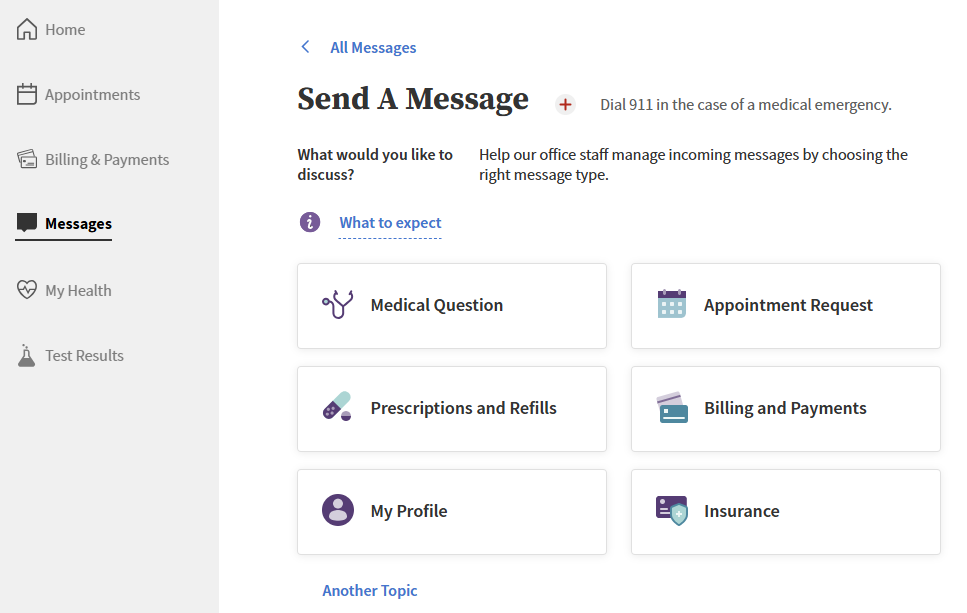
We know it’s important to stay connected with your care team, but because of privacy laws, we cannot use regular email to talk about your health. Instead, we use the CCHS Patient Portal to send and receive secure messages. Through the portal, you can message any member of your care team, like your doctor, nurse, or even the office staff. This keeps your information safe while helping you get the care and answers you need. Your questions are stored on a confidential system in your patient record.
PLEASE BE AWARE: Messages will be responded to within two (2) business days. If you need to talk to someone on the same day, please call your clinic. Phone numbers are provided at the end of this document. If this is an emergency then please call 911, or 988 for the crisis/suicide hotline.
Under “Messages,” you may:
- Ask a medical question
- Request an appointment
- Inquire about prescriptions and refills
- Ask questions about billing, payments, or insurance
VIEWING UPCOMING AND PAST APPOINTMENTS:
You may view past appointments and dates of upcoming appointments under “Appointments” on your CCHS Patient Portal. From this screen, you may also request a new appointment.
BILLING & PAYMENTS:
On the Billing & Payments screen you may:
- See your current account balance, payment history, and past statements
- Update your payment methods for making online payments
- Add or manage insurance on file
VIEWING TEST RESULTS:
The CCHS Patient Portal makes it easy for you to view your test results as soon as they’re ready. You can log in anytime to see results from lab tests, X-rays, or other screenings. This means you don’t have to wait for a phone call or letter—you’ll have quick access to your health information right at your fingertips. If you have questions about your results, you can also send a message to your care team through the portal.
MY HEALTH: A QUICK GUIDE TO YOUR HEALTH INFORMATION
The My Health section in the CCHS Patient Portal is where you can find important information about your care. Here’s a breakdown of what each part includes:
- Health Summary: See a snapshot of your health, including conditions, allergies, vaccinations, procedures, tobacco use, and a list of your care team.
- Care Summaries: Read notes from your care team about your visits.
- Medications: View your current medications and request refills if needed.
- Vitals: Check a record of your vital health stats from past visits.
- Health Records: Download your health information anytime.
- Forms and Documents: Find forms to fill out, like a HIPAA Acknowledgement form, or review helpful documents, like the COVID-19 Patient Information Sheet.
Learning Materials and Reminders: Access educational materials, see health reminders, and review care summaries for referrals.